Neutral EV roaming infrastructure
Connect the charging ecosystem.
One neutral layer between charging networks and the apps drivers use: roaming partners connect once over OCPI, and data customers read public charging data through an API or a feed.
Start here
What brings you to Getz Hub?
Each path leads with what Hub does for you, and ends with an enquiry form for your team.
I operate a charging network
Publish your chargers once and choose which participating apps see them.
For charging networks: i operate a charging networkI operate an EV charging app
Connect your app to participating operator networks through one OCPI connection.
For charging apps: i operate an ev charging appI represent an automotive or mobility brand
Add charging access to your owners’ app or in-car system, or publish dealer chargers.
For automotive brands: i represent an automotive or mobility brandI want to use charging data in my product
Public locations, live availability and tariffs through scoped keys or feeds.
For data and API access: i want to use charging data in my productI operate an international roaming network
Peer as equals for cross-border and visiting drivers.
For roaming hubs: i operate an international roaming network
The problem
Roaming is still built one integration at a time
Every network and every app that want to work together build, test and maintain their own connection. The cost decides who connects, so a driver on the N3 between Johannesburg and Durban, to take one example, carries several apps and smaller networks stay invisible.
Different OCPI versions, agreements kept in e-mail and charge records that do not match the tariff make each connection slower and riskier than it should be.
How Hub connects the ecosystem
Connect once. Agree who you work with. Hub does the routing.
Step 1: Connect once
Join through a self-service link, in the OCPI version you already run.
Step 2: Agree who you roam with
Roaming agreements per partner and per module. Nothing flows without one.
Step 3: Hub routes under your rules
Chargers, tokens, sessions and commands reach only the partners your rules allow.
Step 4: Records are checked
Charge records are checked against the agreed tariff before they reach the app.
Two sides of every roamed session
What operators and apps each get
For charging operators
More drivers on your chargers
- Reach participating appsPublish once; every app you agree to roam with can show your chargers and start sessions on them, from a mall car park to a highway forecourt.
- Choose who sees your chargersYour visibility rules decide which partners see each site; your tariff passes through unchanged and private sites stay private.
- Catch mismatches firstRecords that do not match your tariff are held before the app sees them.
For mobility applications
More chargers for your drivers
- One OCPI connection to operator networksConnect once, then propose roaming agreements with participating operators. Each operator approves its own agreement; ask us which operators fit your market.
- Start, stop and authoriseTokens, sessions and remote commands routed in your OCPI version.
- Same terms as everyoneGetz’s own app connects exactly as you do. No priority lane.
OCPI interoperability
Connect in the OCPI version you already run
Hub serves OCPI 2.1.1, 2.2.1 and 2.3.0 and translates between partners on different versions, so nobody has to upgrade first.
| Capability | OCPI 2.1.1 | OCPI 2.2.1 | OCPI 2.3.0 |
|---|---|---|---|
| Locations and live availability | Yes | Yes | Yes |
| Tariffs | Yes | Yes | Yestax-inclusive |
| Tokens and real-time authorisation | Yes | Yes | Yes |
| Sessions and charge records (CDRs) | Yes | Yes | Yes |
| Remote start and stop commands | Yes | Yes | Yes |
| Smart-charging profiles | No | Yes | Yes |
| Card-terminal payments | No | No | Yes |
| Bookings | No | No | Yes |
Roaming and transaction workflows
From a new partner to a delivered charge record
The Hub as partners and Hub staff use it, captured with synthetic demonstration data.
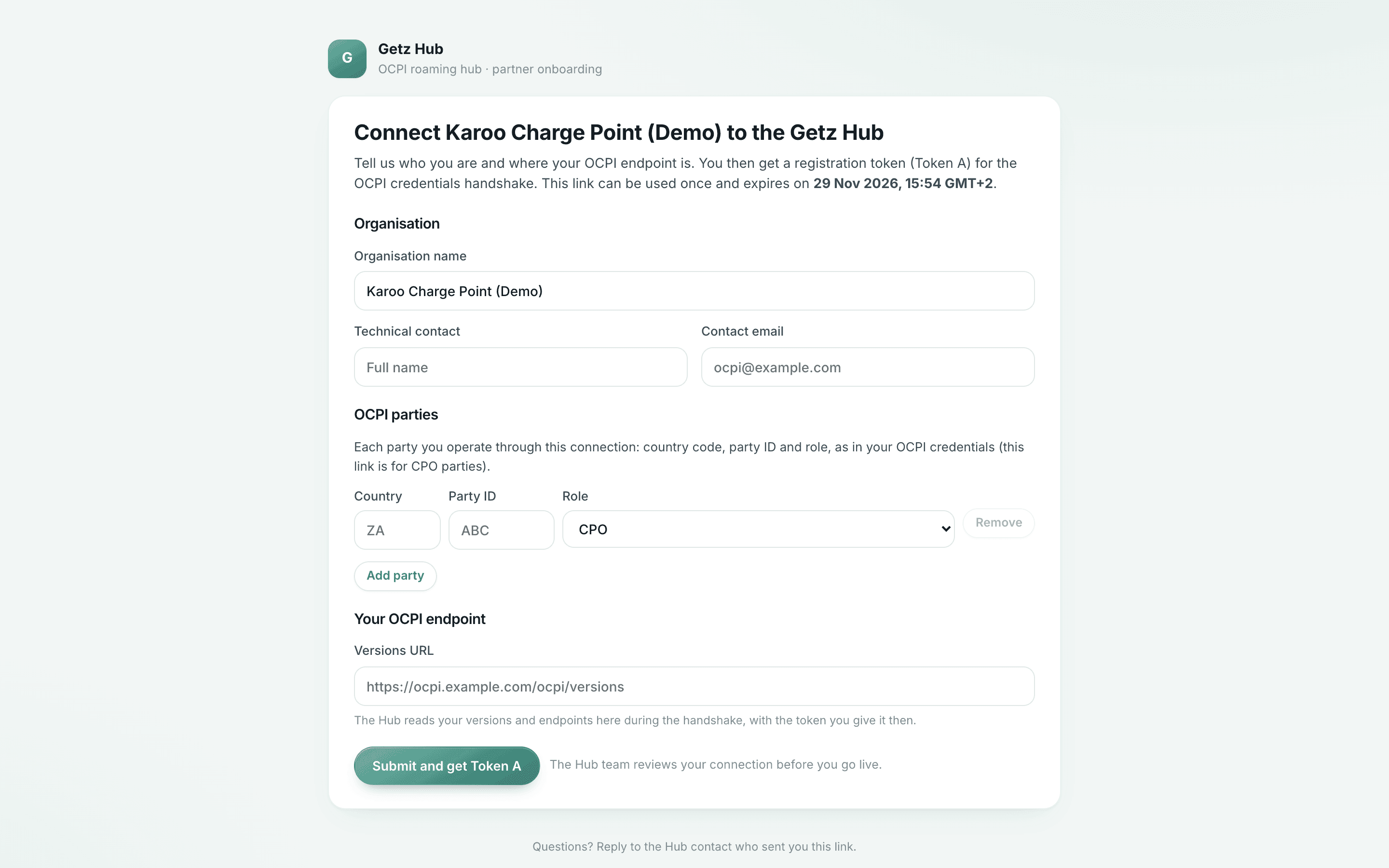
A partner joins from a link
A new partner registers its OCPI parties and completes the credentials handshake from its own back office. Activation waits until connection and module tests pass.
- The link is single-use and expires
- Hub staff approve the partner before it goes live
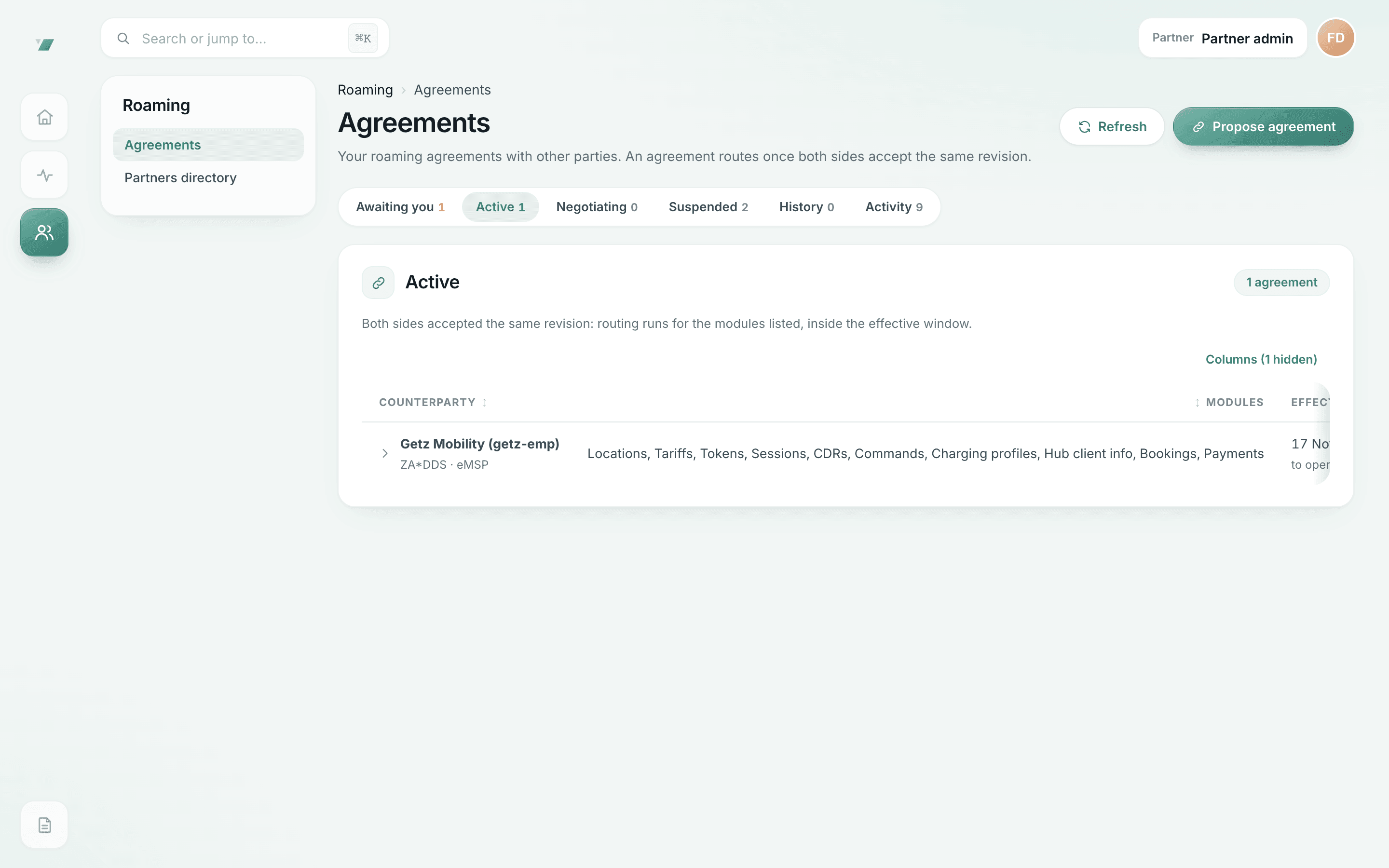
Agreements decide who roams with whom
Partners propose, counter and accept agreements per OCPI module, with start and end dates. Data flows only once both sides accept.
- An agreement routes only once both sides accept the same revision
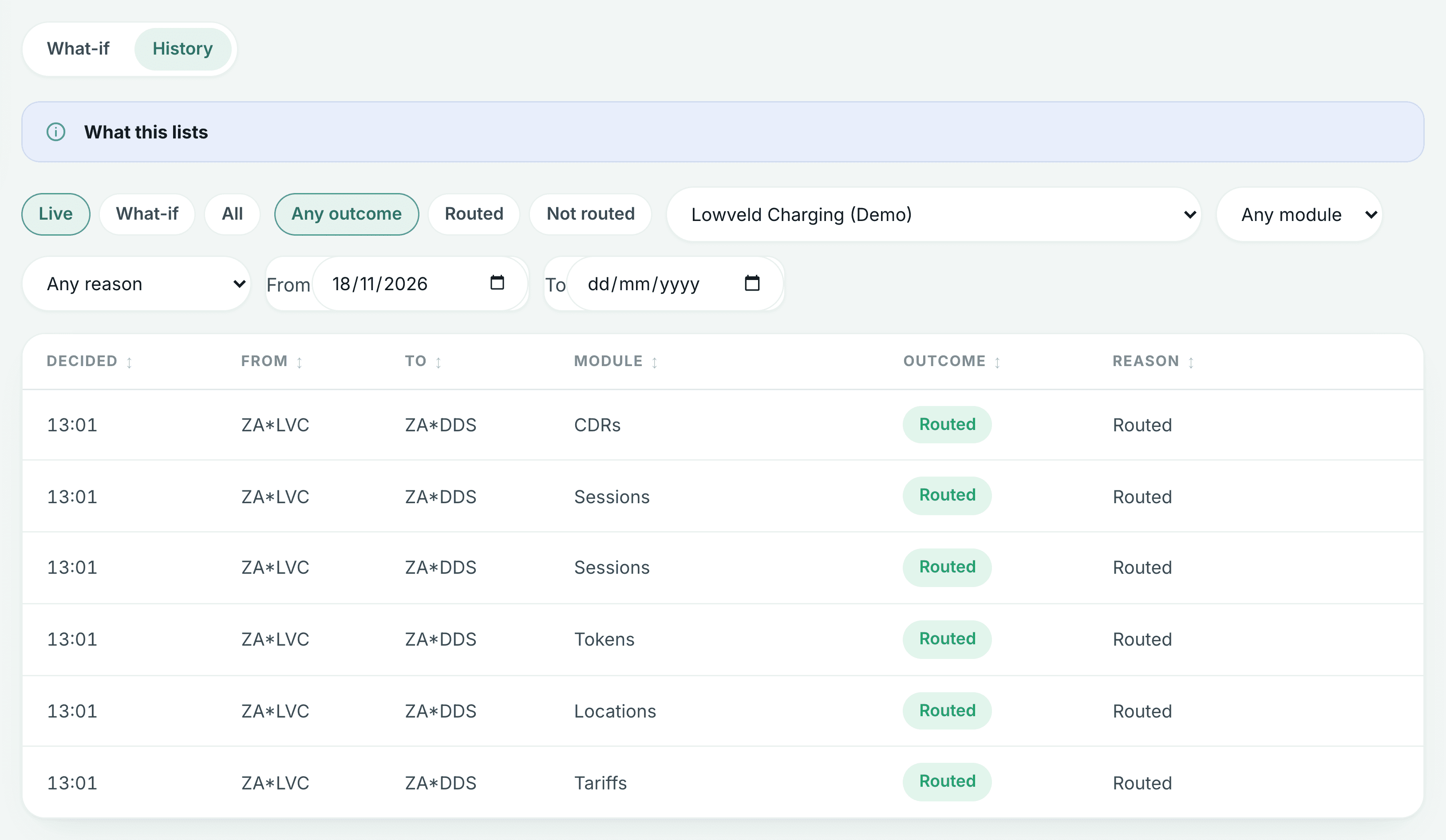
Every routing decision is explained
Each message passes the same checks in the same order. The trace shows which check decided where it went.
- What you see: routing decisions for one demo partner, by module and outcome
- Why it matters: any delivery can be traced back to the decision behind it
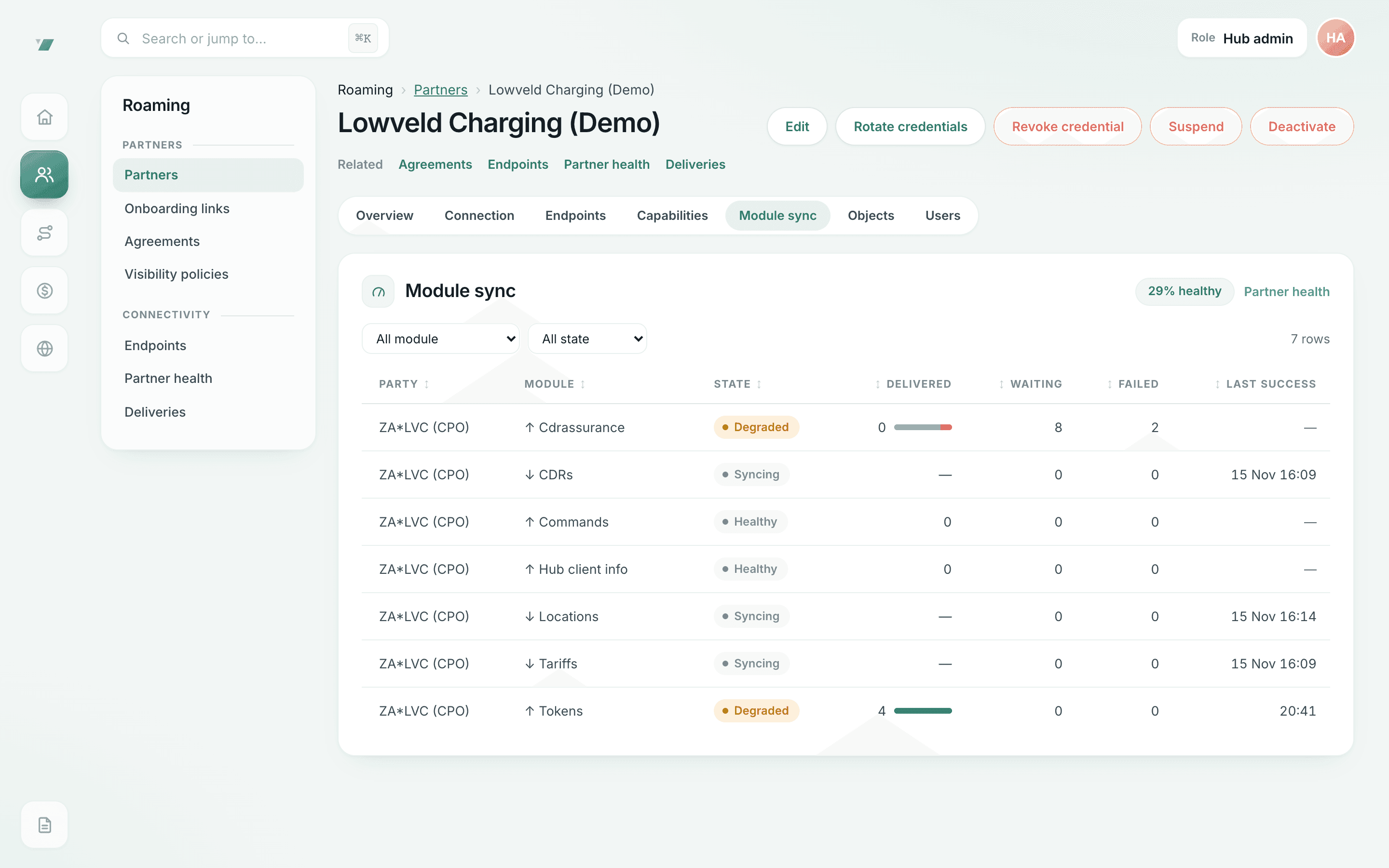
Delivery health per partner and module
What was delivered, what is waiting and what failed, per OCPI module. Partners retry their own failed deliveries once the cause is fixed.
- Degraded modules are flagged with the reason; staff can requeue failed deliveries
- Inbound counts are compared only where the sender reports its own counts
Charge-record assurance
Charge records checked before anyone is billed
Hub checks every roamed charge record against the agreed tariff and identifies mismatches. It re-prices the record from the operator’s own tariff, including tax, idle and reservation fees, and holds a record that does not match before it reaches the app.
A rand tariff is checked in rand, with the VAT the tariff states: 15% for South African sessions.
- Mismatches held until finance staff release or reject them with a reason
Charge records checked against agreed tariffs: mismatches are held until released. Synthetic demo data.
- Overcharged records are held from the eMSP
- Hub staff release a held record with a reason; every decision is audited
What assurance checks, and what it does not
A tariff and reconciliation check, with a clear scope.
| Capability | Checked by Hub | Where it belongs |
|---|---|---|
| The agreed tariff applied to each roamed record | Yes | Hub assurance |
| Tax, idle and reservation fees | Yes | Hub assurance |
| Totals, periods and energy consistent with each other | Yes | Hub assurance |
| Record counts between sender and Hub | Partlywhere the sender reports its counts | Hub sync health |
| Accuracy of the charger’s meter | No | Meter certification (hardware and CPMS) |
| Whether the tariff itself was agreed correctly | No | The operator and the app |
| The app’s driver price, markups and refunds | No | The app |
| Settling money between the parties | No | The partners’ own invoicing |
Partner visibility and data controls
Operators decide who sees what. Hub never widens it.
A location reaches an app only when the operator’s rule or a roaming agreement allows it. Home, fleet and private sites stay hidden unless the operator allows a specific driver token, and an unpublished site is withdrawn from every app.
- Test a visibility rule before you publish
- Each partner sees its own data in the partner portal, and nothing else
- The data API serves public locations only, never sessions or charge records
Visibility rules you can test: the tester shows the party asked about, the rule that decided and the outcome (here: visible, because a roaming agreement is in force). Synthetic demo data.
- Dry run: nothing changes
- Home and private locations stay hidden by default
Neutrality and governance
Neutral by design. Binding by contract.
Hub is owned by the group that also builds Getz Network and Getz EMP. The product controls below apply to Getz’s own products exactly as to every other partner, and the governance measures that make this binding are coming soon.
- In place
Equal partner treatment
Getz’s own products connect through the same agreements, visibility rules and routing checks as every other partner.
- In place
One shared delivery queue
The same queue and retry policy for every partner. No priority lane, including for Getz.
- In place
Controlled data access
Partner isolation and fail-closed visibility: one partner’s data never reaches another partner or another Getz business.
- In place
Explainable routing
Every routing decision is traced and can be explained to the partner it affects, with an audit trail behind it.
- Coming soon
One published price list
The same prices for every partner, with notice before changes; the party that starts a roamed session pays its fee.
- Coming soon
Neutrality charter
A written commitment to equal treatment in every partner contract, Getz’s own products included.
- Coming soon
Ring-fenced Hub entity
Its own accounts and managing director, and at least one independent board member.
- Coming soon
Advisory council and audit
Connected operators and apps consulted on fees and rules; an outside auditor checking routing and prices.
Technical integration
Your OCPI implementation is the integration
Hub is a standard OCPI hub. There is no SDK to install and no proprietary API to learn: register your parties, complete the credentials handshake from your back office and pass the connection tests.
- Self-service onboarding with the standard credentials handshake
- Deliveries, connection health and retries in your own portal
Partner onboarding, step by step: credentials, version negotiation, connection and module tests, then activation. Synthetic demo data.
- A partner is activated only after its connection and module tests pass
Connect your network to Getz Hub
Tell us who you are and what you want to connect. Joining and publishing your chargers costs nothing.